
EXO Script Timing
This page explains exactly when a script or Smart Action presses something, and how hard it pushes a stick. It also covers the five timing and magnitude randomness controls, with each one's range, default and the exact change it makes to the output.
The engine clock
The EXO's engine works in ticks of 1 ms. When a config carries any script, the engine runs at 1000 Hz, whatever output rate the config is set to. A script never changes the engine rate.
How often a script's main runs
A GPC script does not run every engine tick. It runs once per iteration, and the gap between iterations depends on the kind of script:
| Script type | Gap between runs of main
|
vm_tctrl(n) |
|---|---|---|
| Cronus Zen | 10 ms | Sets the next gap to 10 + n ms, within 1–40 ms |
| GPC1 | 10 ms | Sets the next gap to 10 + n ms, within 1–20 ms |
| Titan Two | 1 ms | Ignored |
What happens in one iteration
- Read your controller.
- Run
init(first iteration only). - Run
main. - Run each running combo, in the order they are declared.
- Apply remaps.
- Build the output.
The output is held between iterations. On a 10 ms Zen script, a button you press at 103 ms reaches the console at 110 ms.
Waits and combos
A combo's wait() moves on once per iteration, so on a 10 ms script every wait rounds up to the next 10 ms:
| You write | At a 10 ms period it lasts | At a 1 ms period it lasts |
|---|---|---|
wait(1) |
10 ms | 1 ms |
wait(40) |
40 ms | 40 ms |
wait(45) |
50 ms | 45 ms |
A combo that main restarts loses one period before it starts again.
Worked example: rapid fire
A rapid fire written as 40 ms on and 40 ms off, restarted from main, runs on a Zen-timed script as 40 ms on and 50 ms off: the extra 10 ms is the restart gap. That is 90 ms per shot, or 11.1 presses per second.
combo Rapid {
    set_val(PS4_R2, 100);
    wait(40);          // 40 ms pressed
    set_val(PS4_R2, 0);
    wait(40);          // 40 ms released, plus one 10 ms period on restart
}
Timing models
- Zen timing (default): combos step once per iteration, as above.
- Live timing: combos step every 1 ms, which lowers latency.
Smart Actions always play on the 1 ms engine clock.
Magnitude: how hard a stick or trigger is pushed
In GPC scripts
| Control | Range |
|---|---|
| Buttons | 0 or 100 |
| Triggers | 0 to 100 |
| Sticks | -100 to 100 |
| Hi-res sticks | -32768 to 32767 |
| Accelerometer | 25 = 1 g |
| Gyro | 100 = about 500°/s |
set_val(PS4_RY, 20) pulls the right stick 20% downward. Output values are clamped: 0–100 for buttons and triggers, -100 to 100 for sticks.In Smart Actions
A stick (aim) step uses a magnitude and an angle instead of X and Y:
- How far: 0 to 1 of full deflection, shown in the app as 1–100%.
- Direction: degrees, where 0 = right, 90 = up and 270 = down.
- Which stick: Aim (right) by default, or Move (left).
So "How far 20%, Direction 270" is a 20% pull straight down. You can also measure a stick step in Turn speed (1–4000 deg/s) instead of stick %.
Sensitivity scale
A Speed step scales a stick for a set time instead of pushing it. It multiplies what you do with that stick.
| Field | Range | Default | Meaning |
|---|---|---|---|
| Which stick | Aim (right), Move (left) | Aim | The stick to scale |
| Speed | 0–300%, step 5 | 100% | 100% is unchanged; 50% halves your stick; 200% doubles it |
| Which way | Both, Left / right only, Up / down only | Both | Which axes are scaled |
| How long | 0–10000 ms, step 100 | — | How long the scale lasts |
Smart Action timing fields
| Field | Default | Range |
|---|---|---|
| Press length | 80 ms | 0–10000 ms |
| Counts as held after | 350 ms | 100–2000 ms in the app |
| Taps must land within (double tap) | 300 ms | 150–1000 ms in the app |
| Counts as quick under (tap) | 250 ms | 80–600 ms in the app |
| Give up after | 10 s | up to 30 s |
| Wait before it can fire again (cooldown) | 500 ms | 0–60000 ms |
| How many times | 1 | 1–10 |
| Analog trigger counts as pressed / released | 0.6 / 0.4 | — |
Timing and magnitude randomness
Smart Actions have five controls that vary their output from run to run. Each one changes a specific number in a specific way. Every control set to 0 draws nothing, so a Smart Action with all five at 0 plays exactly the same every time.
| Control | Range | Default | Exactly what it changes |
|---|---|---|---|
| 1. Per-action variance (Human / Exact timing, "Wobble by up to") | 0–500 ms, step 5 | 15 ms when Human is chosen; 0 for Exact | Each timed step's length moves by a random amount within ±V ms, picked once when the step starts. A length never goes below 0. Holds are never varied. |
| 2. Natural timing | 0–1, shown as 0–15 ms | 0 | After control 1, each timed step is lengthened only, by a random 0 to extra ms, where extra = the smaller of (amount × 15) and a quarter of the step's length. |
| 3. Wait variation % | 0–50% | 0 | When set, replaces control 2. Each timed step is lengthened only, by a random 0 to (length × % ÷ 100) ms. |
| 4. Stick variance | 0–10 percentage points | ±1 | Each non-zero stick push moves by a random amount within ±V points of full deflection, picked once per step. It never changes sign. Zero stays zero and a full push stays full. Triggers and mouse MOVE steps are never varied. |
| 5. Aim angle variation | 0–15° | 0 | Each stick push is rotated by a random amount within ±A degrees, picked once per step. A full push is not rotated, and neither is an action set to Exact. |
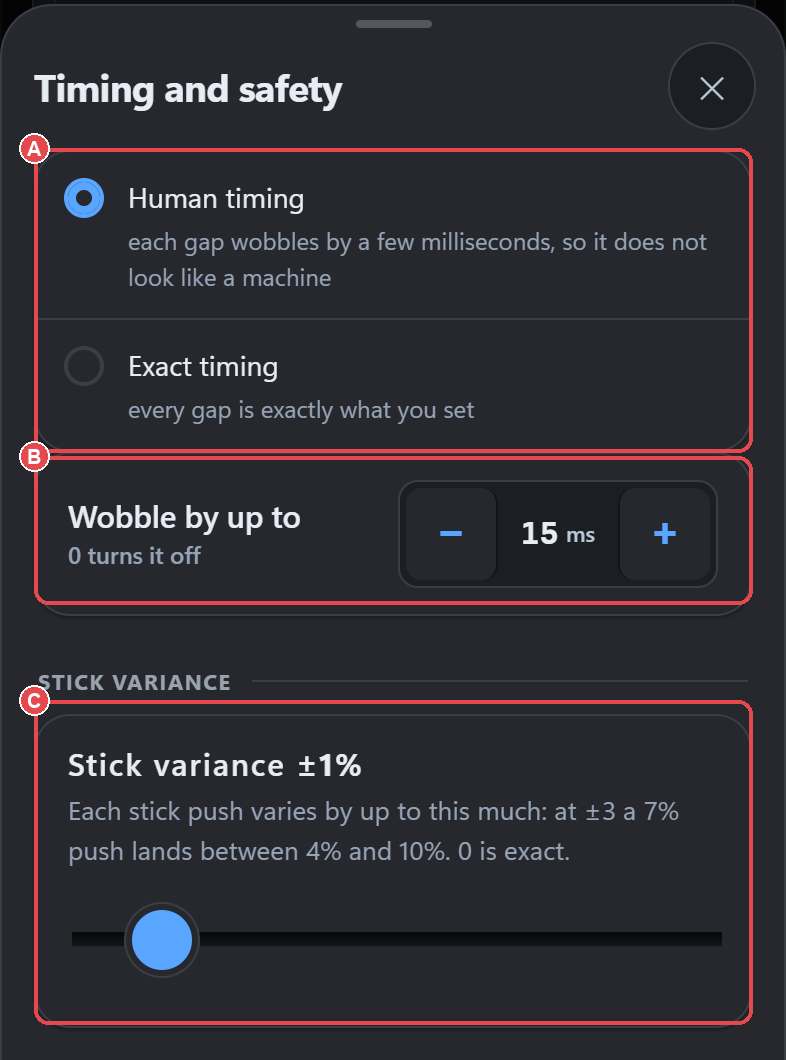
Worked examples
- Natural timing at full (15 ms): a 40 ms tap becomes 40–50 ms (the extra is capped at a quarter of 40, which is 10). A 3 ms step stays exactly 3 ms.
- Wait variation 15%: a 40 ms tap becomes 40–46 ms. A 1 s wait becomes 1000–1150 ms.
- Per-action variance 15 ms: an 80 ms press lasts anywhere from 65 to 95 ms.
- Stick variance 2: a 20% pull down lasts its step at somewhere between 18% and 22%.
- Aim angle variation 5°: a pull at 270° points somewhere between 265° and 275° for that step.
Randomness in GPC scripts
The script engine adds no timing randomness of its own: a script runs exactly as written. A script that wants variation uses rand() itself, for example:
int hold;
combo Tap {
    hold = 40 + (rand() % 10);   // 40 to 49 ms
    set_val(PS4_R2, 100);
    wait(hold);
    set_val(PS4_R2, 0);
    wait(40);
}Related: GPC scripts · Smart Actions · Settings reference