
EXO AI Scripts
AI Scripts and Screen Assist let the EXO react to what is on your screen. The EXO itself reads weapon names and watched screen areas to switch your scripts, and EXO Studio on your PC runs Titan Two-style vision packs from an HDMI capture.
How it works
Your console's picture goes through an HDMI capture so the EXO system can see the game. What happens next depends on where the vision runs:
| Where | What it does | How it talks to your controller |
|---|---|---|
| On the EXO (AI Scripts) | Reads the weapon name in a HUD corner (the Gun reader) and watches screen areas you draw | Turns your config's scripts and Smart Actions on and off, or switches config |
| On your PC (Screen Assist in EXO Studio) | Runs a game pack: a Python vision worker plus a GPC partner script, the same pair a Titan Two uses | Each frame's result goes to the EXO over USB, and the pack's GPC script reads it with gcv_read
|
Aim assist and NBA 2K shot timing run on the PC in EXO Studio. The EXO itself does not do aim assist. The phone app does not run vision packs; it handles AI Scripts on the EXO.
The three modes
| Mode | What is running | How you turn it on |
|---|---|---|
| AI Scripts on the EXO | Gun reader and watched areas switch your scripts and Smart Actions | Phone app > Scripts > AI Scripts, and Screen Assist for the boxes |
| EXO Studio mode | The PC takes the capture and runs a game pack. The EXO's own AI Scripts switch off while Studio has the capture. | Pick a game pack in EXO Studio; Studio turns this mode on for you |
| Tournament Mode | No scripts, AI or vision packs, recoil, turbo or injected moves. Your remaps and aim settings stay. | Global Settings > General in the app, or Settings in EXO Studio |
Weapon detection (Gun reader)
The Gun reader works out which gun you have out and turns on that gun's scripts. The current gun shows as the Active Weapon card on HOME.
- Open Screen Assist and turn on Show the picture.
- Choose Draw boxes and draw a box over the place your game shows the weapon name.
- With a gun out, use What is on screen right now? to teach the box that gun's name. Teach one picture per gun or weapon class.
- In Scripts > AI Scripts, link each gun to the scripts, Smart Actions or config it should turn on.
Watched areas
Any box can watch for something other than a weapon. In the Area sheet, What should your adapter do with it? offers:
- Search ONLY here / Ignore this area
- Watch for a colour
- Watch it light up
- Watch for movement
- Read what it says / Read a number
Label it (Ammo counter, Health bar, Crosshair, Mini-map, Scoreboard, On-screen prompt) and give it a name up to 28 characters. In testing on the EXO with a 60 fps capture, a watched area first saw a change in a median of 88 ms at 25 reads per second, and 120 ms at 10 reads per second.
Screen Assist in EXO Studio
Set it up
- Plug the EXO and your HDMI capture into the PC. Open EXO Studio and accept the Terms. No account is needed and it is free.
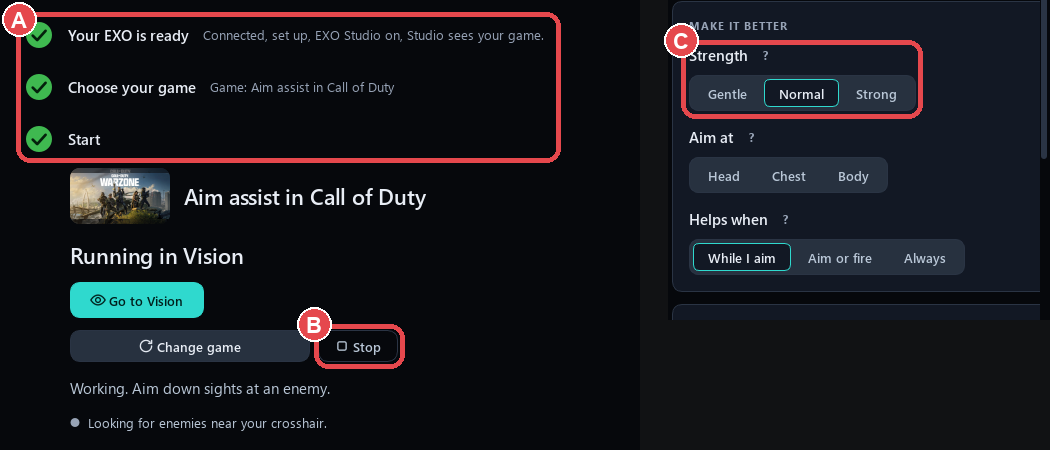
- Open Play. Its checklist ticks itself: the EXO answers, a real picture arrives, a game is picked, Studio mode is on, and the pack is running.
- Pick a game pack: CoD aim assist, Apex aim assist or NBA 2K26 auto-green.
- Turn it on or off with the big switch or F5.
- Choose Strength: Gentle, Normal (default) or Strong.
- Open Fine-tune for Aim at (Head / Chest / Body) and Helps when (While I aim / Aim or fire / Always).
Game packs
- The CoD and Apex packs use ZeroStick's own detector, trained on game frames. CoD tracks the enemy marker colour by default; Apex uses the detector by default.
- By default the aim packs help only while you aim, because the detector cannot tell team-mates from enemies.
- Behind the scenes, Studio compiles the pack's GPC half into slot 1 and shows the pack's settings as plain controls.
Add a Titan Two vision pack
- Go to Library > Add a game pack (or Add a pack folder).
- Choose the
.pyand.gpcpair, a folder, or a.zip. - The pack appears under Your packs. Start it from Play. Its settings show as plain controls.
- The first time an unknown vision script runs, Studio asks Always trust or Run once.
NBA 2K shot timing
Hold Shoot as normal and the EXO releases at the green. Was early and Was late move the timing by 5 ms per press. Measure my delay learns your capture and TV delay over 5 shots. The game reads the controller once a frame (about 16.7 ms), so release timing cannot be finer than that. Letting go yourself always releases the shot.
Safety controls
Vision packs work like they do on a Titan Two: a pack's script can push sticks across their full range and press buttons. These are the controls that limit it:
- Each pack's own limits. The bundled packs have Strength, Smoothing and a Pull cap. Set these first.
- Your config's caps. The config's stick and trigger caps and disabled buttons apply after every script and pack.
- The kill switch. Turn off Adapter is sending inputs on the Overview, and the EXO stops pressing anything at once. In Studio, F5 turns the pack off.
- Tournament Mode stops scripts, vision packs, recoil, turbo and injected moves.
- Nothing runs during calibration, during the Recoil Workshop, or in Navigate Mode.
Related: EXO Studio · GPC scripts · Troubleshooting